CPU first
Automatic routing keeps ambiguous workloads on the CPU. A supported accelerator is an option for compatible code—not a promise that ordinary Python becomes GPU code.
PyRe 1.0 · Available Now · Windows x64
Keep your workload on your machine. PyRe brings resource planning, conservative routing, a durable controller, and run evidence to local Python execution. Run verified CPU and NVIDIA CUDA jobs with output parity and receipt logging.
Native Windows Desktop Workbench
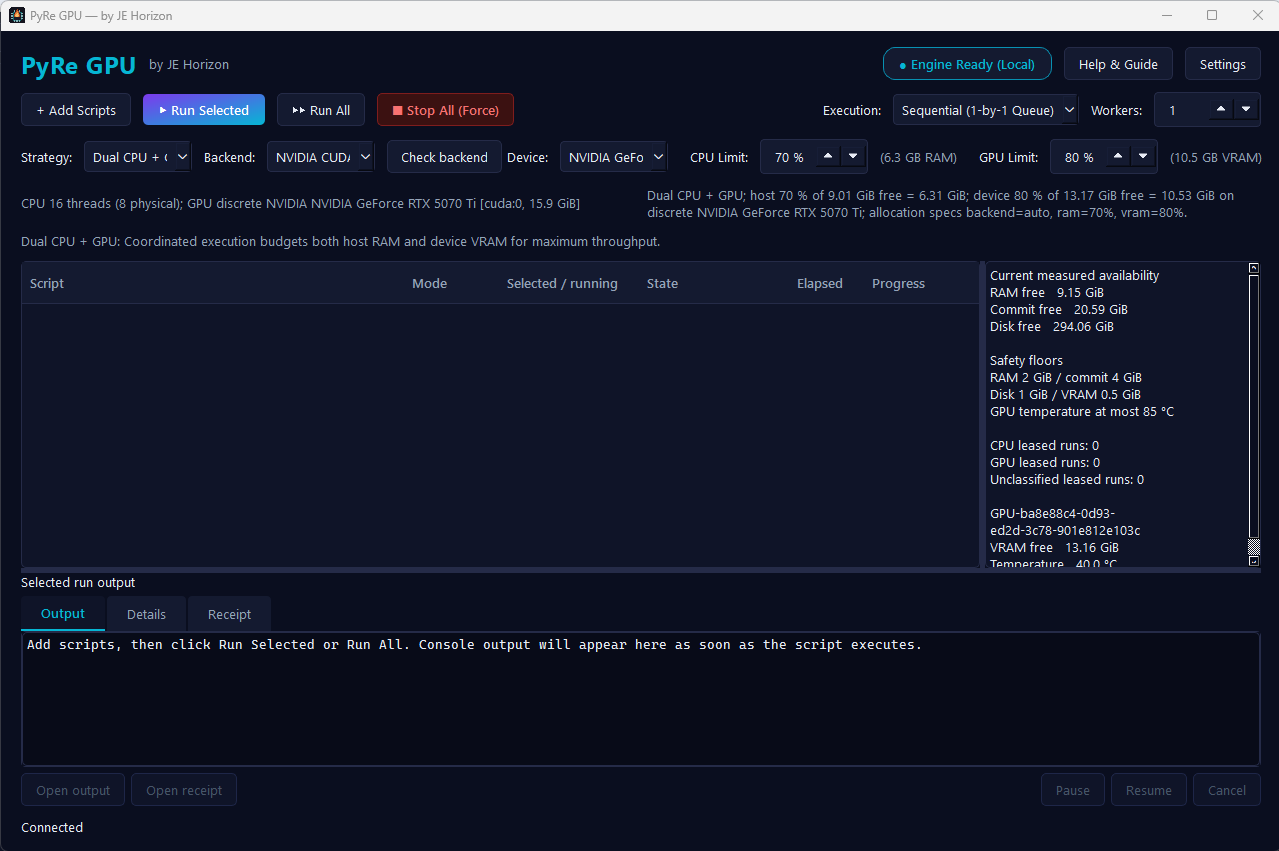
Manage sequential or parallel script runs with live CPU and GPU allocation gauges, process supervision, and atomic run receipts.
The current desktop release runs CPU and NVIDIA CUDA jobs. Intel XPU and AMD ROCm can be probed, but cannot currently be scheduled. Their setup links and example branches below are reference material for future support, not runnable desktop options in this release.
Automatic routing keeps ambiguous workloads on the CPU. A supported accelerator is an option for compatible code—not a promise that ordinary Python becomes GPU code.
Inspect hardware and an allocation plan before starting work. Leave capacity for the operating system and other applications.
Durable status and recovery records help explain what started, what finished, and what needs attention. Missing evidence should stay unknown.
Choose acceleration using representative inputs, matching outputs, and total time—including transfers. A faster kernel does not always mean a faster program.
PyRe is an execution controller, not a chat model or a security sandbox. Run only code and commands you trust. It does not rewrite ordinary Python or move data to a GPU for you.
The PySide6 desktop submits work to the same durable local controller used for resource admission, execution, status, recovery, and receipts. Current protected host acceptance passed on Windows x64 with CPython 3.10, 3.11, 3.12, and 3.13. Actual CPU/CUDA execution and output parity passed on an NVIDIA GeForce RTX 5070 Ti. These results describe the tested configurations, not every GPU or workload.
Optional acceleration still depends on compatible code, the operating system, an officially supported device and driver, and a matching framework build. PyRe 1.0 is available now for Windows x64 with perpetual one-time purchase at $29 USD.
PyRe reserves and launches the selected lane. Your workload must explicitly create or move tensors on that device. Start with the downloadable CPU/GPU proof script; set its BACKEND constant to match the mode you choose in PyRe. Its CPU path uses only the Python standard library, while its optional accelerator path imports PyTorch, checks the real runtime device, includes transfers and synchronization in timing, compares output with CPU, and exits with an error instead of silently falling back.
PYTHON_GPU_CUDA_PYTHON, PYTHON_GPU_XPU_PYTHON, or PYTHON_GPU_ROCM_PYTHON. The current desktop Settings dialog shows these effective paths; it does not install frameworks or change them for a controller that is already running.BACKEND near the top of how-to.py to "cpu", "cuda", "xpu", or "rocm". In PyRe, add that file, choose the matching mode and physical device, and select Check backend. A backend check proves current framework/device identity, not that arbitrary code will accelerate.actual_device, parity=PASS, and transfer-inclusive elapsed time. AMD ROCm PyTorch intentionally uses the torch.cuda Python API and verifies that the runtime reports HIP.# PowerShell — replace this placeholder with the absolute GPU-environment interpreter
$env:PYTHON_GPU_CUDA_PYTHON = "C:\path\to\gpu-venv\Scripts\python.exe"
& ".\Launch PyRe.cmd"
Start PyRe from that same PowerShell session so the controller inherits the CUDA setting. The XPU and ROCm variables are reference configuration only; they do not enable scheduling in the current desktop release.
Choose an explicit accelerator mode when GPU execution is required. Auto keeps ambiguous work on CPU. PyRe does not promise OpenCL, DirectML, Vulkan, Apple GPU support, or automatic conversion of CPU code.
| Lane | Support designed | Verified now |
|---|---|---|
| CPU | Standard Python and CPU framework workloads | Protected Windows x64 host acceptance passed on CPython 3.10–3.13 |
| NVIDIA CUDA | Explicit CUDA through a matching PyTorch environment and selected physical device | Actual CPU/CUDA execution and parity passed on an RTX 5070 Ti; this does not cover every NVIDIA GPU |
| Intel XPU | Explicit XPU adapter, interpreter probe, device identity, and reservation | Not currently schedulable in the desktop release; physical Intel GPU acceptance is also NOT_CHECKED |
| AMD ROCm | Explicit ROCm adapter using PyTorch's CUDA-compatible Python API, device identity, and reservation | Not currently schedulable in the desktop release; physical AMD GPU acceptance is also NOT_CHECKED. Windows framework support is limited to AMD's current matrix |
Simple Perpetual Pricing
No recurring subscriptions, no cloud fees, and no telemetry gates. One customer perpetual license with all compatible v1.x updates included.
For Python developers and ML practitioners who want dependable local execution.
Combine local Python execution with our free private desktop AI companion.
Or download Wittlet standalone for free.
PyRe 1.0 is published and available for immediate purchase and download. The native Windows x64 setup package is built with AES-256 encrypted release distribution and authenticated via Hugging Face and Fly.io.
A one-time purchase of $29 USD via Stripe or PayPal entitles you to perpetual use of PyRe with no monthly fees. Immediately after purchase, a secure download link and purchase receipt are delivered to your email.